Take Home Exercise 03

Author

Ruosong

1.Overview

In this take home exercise, the rainfall data provided by Singapore Queen Street station will be re-designed to enhance the user experience in data discovery and/or visual story-telling.

2.Task

  • Redesign the historical daily rainfall data set from Queen street weather station.

  • Select either daily rainfall records of December of the year 1983, 1993, 2003, 2013 and 2023 and create an analytics-driven data visualization,

  • Appropriate interactive techniques will be applied to enhance the user experience in data discovery and/or visual story-telling.

3.Install Packages

In this exercise multiple packages will be involved to create interactive and animated time series data visualization.

Code
pacman::p_load(ggrepel, patchwork, 
               ggthemes, hrbrthemes,
               scales, viridis, lubridate, 
               ggthemes, gridExtra, readxl, knitr, 
               data.table, CGPfunctions, 
               ggHoriPlot, tidyverse,ggiraph, plotly, 
               patchwork, DT,ggdist, ggridges, ggthemes,
               colorspace,ggstatsplot,readxl, performance, 
               parameters, see,ungeviz, plotly, crosstalk,
               DT, ggdist, ggridges,colorspace, gganimate,
               FunnelPlotR,readxl, gifski, gapminder,gganimate,ggpubr)

4.Data Preparation

4.1 Import orignal data into R environment

In this section we are going to import five data sets into R environment which are daily rainfall data in December of year 1983, 1993, 2003, 2013, 2023.

rain1983 <- read_csv("data/DAILYDATA_S77_198312.csv") 
rain1993 <- read_csv("data/DAILYDATA_S77_199312.csv") 
rain2003 <- read_csv("data/DAILYDATA_S77_200312.csv") 
rain2013 <- read_csv("data/DAILYDATA_S77_201312.csv") 
rain2023 <- read_csv("data/DAILYDATA_S77_202312.csv") 

4.2 Data Cleaning

Since we do not have much columns and rows in our data sets, we can just examine them by just view() them. The result shows there is no missing value and duplicates.

rain1983
# A tibble: 31 × 5
   Station     Year Month   Day `Daily Rainfall Total (mm)`
   <chr>      <dbl> <dbl> <dbl>                       <dbl>
 1 Queenstown  1983    12     1                         3.5
 2 Queenstown  1983    12     2                         0.8
 3 Queenstown  1983    12     3                         4.9
 4 Queenstown  1983    12     4                         0  
 5 Queenstown  1983    12     5                         0  
 6 Queenstown  1983    12     6                         0  
 7 Queenstown  1983    12     7                         0  
 8 Queenstown  1983    12     8                         1.7
 9 Queenstown  1983    12     9                        31.7
10 Queenstown  1983    12    10                        11.6
# ℹ 21 more rows
rain1993
# A tibble: 31 × 5
   Station     Year Month   Day `Daily Rainfall Total (mm)`
   <chr>      <dbl> <dbl> <dbl>                       <dbl>
 1 Queenstown  1993    12     1                       108. 
 2 Queenstown  1993    12     2                        89.4
 3 Queenstown  1993    12     3                        39.3
 4 Queenstown  1993    12     4                        35.1
 5 Queenstown  1993    12     5                         6.3
 6 Queenstown  1993    12     6                         7.6
 7 Queenstown  1993    12     7                         0  
 8 Queenstown  1993    12     8                        38  
 9 Queenstown  1993    12     9                         0  
10 Queenstown  1993    12    10                        10.1
# ℹ 21 more rows
rain2003
# A tibble: 31 × 5
   Station     Year Month   Day `Daily Rainfall Total (mm)`
   <chr>      <dbl> <dbl> <dbl>                       <dbl>
 1 Queenstown  2003    12     1                         0.1
 2 Queenstown  2003    12     2                        28.3
 3 Queenstown  2003    12     3                         0  
 4 Queenstown  2003    12     4                         0  
 5 Queenstown  2003    12     5                         0.3
 6 Queenstown  2003    12     6                         0.1
 7 Queenstown  2003    12     7                         3.4
 8 Queenstown  2003    12     8                         0.2
 9 Queenstown  2003    12     9                        16.6
10 Queenstown  2003    12    10                         7.9
# ℹ 21 more rows
rain2013
# A tibble: 31 × 5
   Station     Year Month   Day `Daily Rainfall Total (mm)`
   <chr>      <dbl> <dbl> <dbl>                       <dbl>
 1 Queenstown  2013    12     1                        22.6
 2 Queenstown  2013    12     2                         7  
 3 Queenstown  2013    12     3                        27.2
 4 Queenstown  2013    12     4                         0.2
 5 Queenstown  2013    12     5                         0  
 6 Queenstown  2013    12     6                         4  
 7 Queenstown  2013    12     7                         0  
 8 Queenstown  2013    12     8                        24.2
 9 Queenstown  2013    12     9                         0.2
10 Queenstown  2013    12    10                         0.2
# ℹ 21 more rows
rain2023
# A tibble: 31 × 5
   Station     Year Month   Day `Daily Rainfall Total (mm)`
   <chr>      <dbl> <dbl> <dbl>                       <dbl>
 1 Queenstown  2023    12     1                        11.2
 2 Queenstown  2023    12     2                         0  
 3 Queenstown  2023    12     3                         1.2
 4 Queenstown  2023    12     4                         1.8
 5 Queenstown  2023    12     5                         6.8
 6 Queenstown  2023    12     6                        28.6
 7 Queenstown  2023    12     7                        28.2
 8 Queenstown  2023    12     8                        41.2
 9 Queenstown  2023    12     9                         0  
10 Queenstown  2023    12    10                         0  
# ℹ 21 more rows

4.3 Data Wrangling

Since the background knowledge about the data sets such as station and month are already given, those columns will be remove. Also, multiple data sets is not good for our further analyses. Therefore, in this section, the redundant columns will be remove and all the data sets will be merged into one. I also create a long data set called rainfall_long, that will be helpful when we create graphs.

rain1983$rainfall_1983<-rain1983$`Daily Rainfall Total (mm)`
rain1993$rainfall_1993<-rain1993$`Daily Rainfall Total (mm)`
rain2003$rainfall_2003<-rain2003$`Daily Rainfall Total (mm)`
rain2013$rainfall_2013<-rain2013$`Daily Rainfall Total (mm)`
rain2023$rainfall_2023<-rain2023$`Daily Rainfall Total (mm)`

rain1983 <- rain1983 %>% select(Day,rainfall_1983)
rain1993 <- rain1993 %>% select(Day,rainfall_1993)
rain2003 <- rain2003 %>% select(Day,rainfall_2003)
rain2013 <- rain2013 %>% select(Day,rainfall_2013)
rain2023 <- rain2023 %>% select(Day,rainfall_2023)

rainfall <- rain1983 %>%
  inner_join(rain1993, by = "Day") %>%
  inner_join(rain2003, by = "Day") %>%
  inner_join(rain2013, by = "Day") %>%
  inner_join(rain2023, by = "Day")
rainfall
# A tibble: 31 × 6
     Day rainfall_1983 rainfall_1993 rainfall_2003 rainfall_2013 rainfall_2023
   <dbl>         <dbl>         <dbl>         <dbl>         <dbl>         <dbl>
 1     1           3.5         108.            0.1          22.6          11.2
 2     2           0.8          89.4          28.3           7             0  
 3     3           4.9          39.3           0            27.2           1.2
 4     4           0            35.1           0             0.2           1.8
 5     5           0             6.3           0.3           0             6.8
 6     6           0             7.6           0.1           4            28.6
 7     7           0             0             3.4           0            28.2
 8     8           1.7          38             0.2          24.2          41.2
 9     9          31.7           0            16.6           0.2           0  
10    10          11.6          10.1           7.9           0.2           0  
# ℹ 21 more rows
library(tidyr)

# Gather columns into long format
rainfall_long <- gather(rainfall, key = "Year", value = "Rainfall", starts_with("rainfall_"))

g_year <- sub("rainfall_", "", rainfall_long$Year)

rainfall_long$ActualYear <- g_year
rainfall_long
# A tibble: 155 × 4
     Day Year          Rainfall ActualYear
   <dbl> <chr>            <dbl> <chr>     
 1     1 rainfall_1983      3.5 1983      
 2     2 rainfall_1983      0.8 1983      
 3     3 rainfall_1983      4.9 1983      
 4     4 rainfall_1983      0   1983      
 5     5 rainfall_1983      0   1983      
 6     6 rainfall_1983      0   1983      
 7     7 rainfall_1983      0   1983      
 8     8 rainfall_1983      1.7 1983      
 9     9 rainfall_1983     31.7 1983      
10    10 rainfall_1983     11.6 1983      
# ℹ 145 more rows

5.Data Visulization

5.1 Compare Rainfall Day by Day Among Different Years

By using the long version of the data set, we are able to plot all rainfall information into one graph by different days. Then we can easily compare each days’ rainfall among different year by simply click the bar under the graph.

gg <- ggplot(rainfall_long, 
       aes(x = Day, 
           y = Rainfall,
           size = Rainfall,
           color = as.factor(ActualYear)
           )) +
  geom_point(aes(size = Rainfall, frame = Day),
             alpha = 0.7) +
  scale_colour_manual(values = c("1983" = "blue", 
                                  "1993" = "red", 
                                  "2003" = "green", 
                                  "2013" = "orange", 
                                  "2023" = "purple")) +
  scale_size(range = c(2, 12)) +
  labs(x = 'Days in December', 
       y = 'Rainfall') + 
  theme(legend.position='bottom') +
  guides(color = guide_legend(title = "Year", 
                             override.aes = list(size = 3),
                             ncol = 1))

ggplotly(gg)

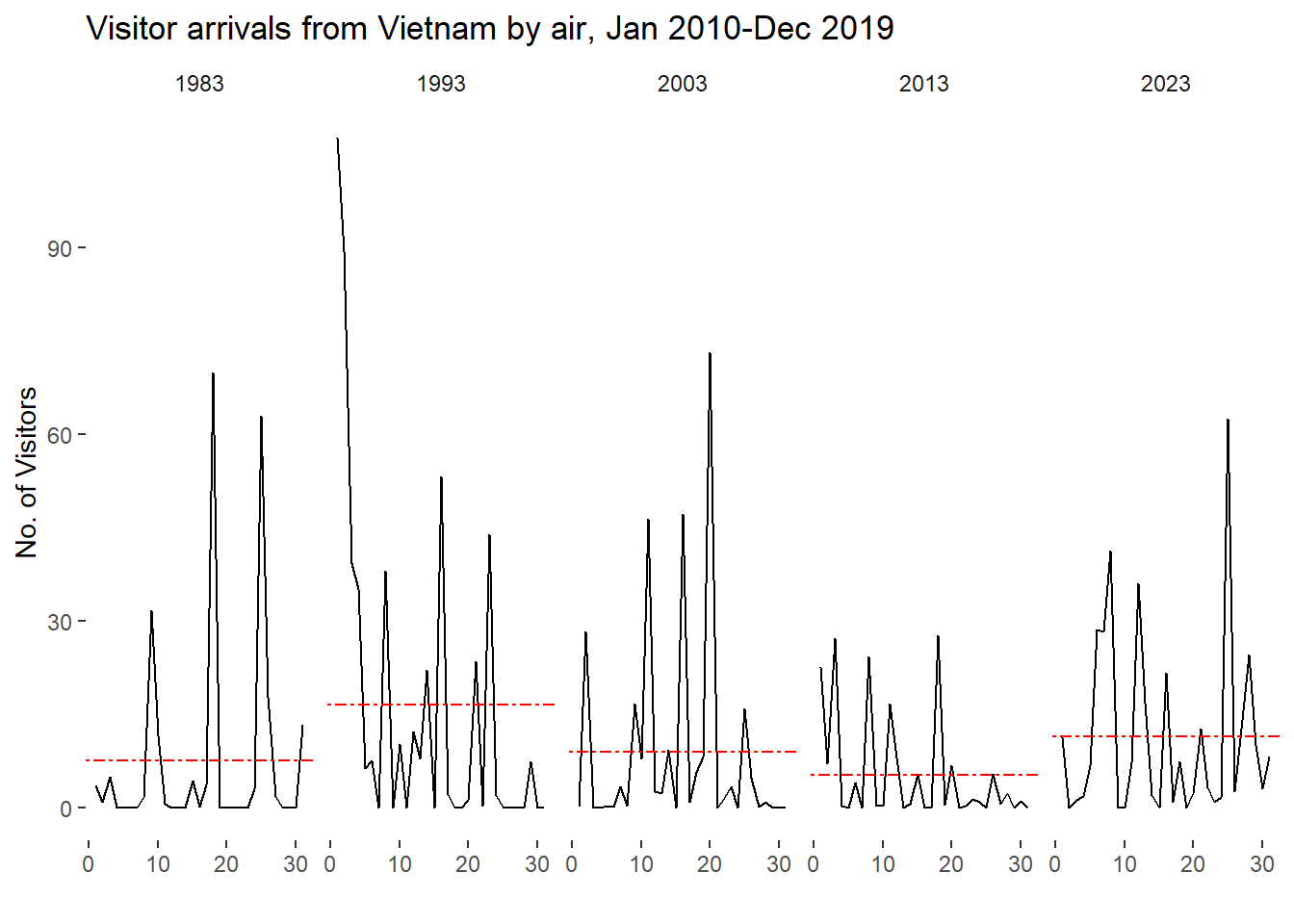
5.3 Cycle plot

In this section cycle plot will be create to show the time-series patterns and trend of rainfall data. In this way user can see the average rainfall of each year and the daily rainfall information in one graph.

ggplot() + 
  geom_line(data=rainfall_long,
            aes(x=Day, 
                y=Rainfall, 
                group=ActualYear), 
            colour="black") +
  geom_hline(aes(yintercept=avgvalue), 
             data=Avg.data, 
             linetype=6, 
             colour="red", 
             size=0.5) + 
  facet_grid(~ActualYear) +
  labs(axis.text.x = element_blank(),
       title = "Visitor arrivals from Vietnam by air, Jan 2010-Dec 2019") +
  xlab("") +
  ylab("No. of Visitors") +
  theme_tufte(base_family = "Helvetica")

Summury

In this exercise, the December rainfall data of year 1983, 1993, 2003, 2013 and 2023 were visualized and compared. It is clear that 1993 has the most rainfall and 2023 has the second most. However, there is no clear evidence to show any pattern about how the rainfall is changing during time.